

Role Management
Role based access control (RBAC)
Section titled “Role based access control (RBAC)”Role-Based Access Control (RBAC) is a widely adopted security model used to restrict system access to authorized users based on their assigned roles. Instead of granting permissions directly to individual users, RBAC assigns permissions to roles, and users are then associated with one or more roles. This approach simplifies management, enhances security, and supports the principle of least privilege.
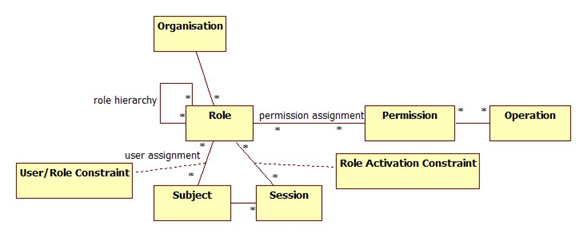
In the context of the DatAscend API and its integrations, role based access control is structured around five core components:
Describing roles within the system
Section titled “Describing roles within the system”A Role defines a set of permissions that reflect a specific job function or responsibility within the system. Roles are not tied to specific users but rather to the actions users are allowed to perform.
Roles are named, so the user can easily identify them. Some examples the user might create or encounter include:
Role Description Coming by default Administrator Full permissions Yes Anonymous Very limited permissions Yes Manager Can change settings within the entity configuration No Editor Can create and modify content within the entities they have access to No Viewer Can only view content within the entities they have access to No
Anonymous role permission and interaction
Section titled “Anonymous role permission and interaction”The Anonymous role is designed for users who are not logged into the system. This role has very limited permissions, primarily focused on viewing public content without the ability to modify or manage any resources. The specific permissions associated with the Anonymous role may include:
- Read access to publicly available entities and reports.
- No ability to create, update, or delete any objects.
- No access to sensitive or restricted data.
This role is useful for scenarios where you want to provide basic information to users without requiring authentication. For example, a public dashboard or report that anyone can view without logging in, or reporting it to someone else.
Actions
Section titled “Actions”Actions define what operations can be performed on objects.
Action Description Manage Allows management of existing objects. Create Allows the creation of new objects. Get Allows viewing of existing objects. Update Allows modification of existing objects. Delete Allows removal of existing objects.
Objects
Section titled “Objects”Objects represent the resources or entities within the system that users can interact with, such as:
- Category Menus
- Relationships
- Datasources
- Structure
- Entities
- Domains
- Reports
Permissions
Section titled “Permissions”Permissions are the result of combining actions with objects. For example, the permission to create an entity record is formed by combining the “create” action with the entity named object within the system.
Permissions are assigned to roles, not directly to users.
Endpoints for role management
Section titled “Endpoints for role management”Below are the available endpoints for managing roles:
Get all roles
Section titled “Get all roles”Retrieve all roles stored.
Endpoint:
Response example:
Create a new role
Section titled “Create a new role”Create a new role.
Endpoint:
Request example:
Response example:
Update a role
Section titled “Update a role”Update an existing role.
Endpoint:
Request example:
Response example:
Get a role
Section titled “Get a role”Retrieve a specific role by its ID.
Endpoint:
Response example:
Delete a role
Section titled “Delete a role”Delete a specific role by its ID.
Endpoint:
Response code:
Endpoint for managing role properties
Section titled “Endpoint for managing role properties”Below are the available endpoints for managing role functionality:
Get all objects
Section titled “Get all objects”Retrieve all objects stored.
Endpoint:
Response example:
Get all actions
Section titled “Get all actions”Retrieve all actions stored.
Endpoint:
Response example:
Get all available permissions stored on object
Section titled “Get all available permissions stored on object”Retrieve all available permissions stored on a specific object.
Endpoint:
Response example:
Get permissions stored on role by given object
Section titled “Get permissions stored on role by given object”Retrieve permissions stored on a role for a given object.
Endpoint:
Response example:
Overwrite permissions stored on role by given object
Section titled “Overwrite permissions stored on role by given object”Overwrite permissions stored on a role for a given object.
Endpoint:
Request example:
Response example:
Endpoints for assigning roles within a category menu
Section titled “Endpoints for assigning roles within a category menu”Below are the available endpoints for assigning roles to category menus:
Get all roles assigned to a category menu
Section titled “Get all roles assigned to a category menu”Retrieve all roles assigned to a specific category menu.
Endpoint:
Response example:
Assign multiple roles to a category menu
Section titled “Assign multiple roles to a category menu”Assign multiple roles to a specific category menu.
Endpoint:
Request example:
Response example:
Remove one or more roles to a category menu
Section titled “Remove one or more roles to a category menu”Remove one or more roles to a specific category menu.
Endpoint:
Request example:
Response example:
Endpoint for managing roles within a permission set
Section titled “Endpoint for managing roles within a permission set”Below are the available endpoints related to permissions:
Get permissions stored on role by given object
Section titled “Get permissions stored on role by given object”Retrieve permissions stored on a role in studio by a given object.
Endpoint:
Response example:
Get all permissions stored on role by given object
Section titled “Get all permissions stored on role by given object”Retrieve all permissions stored on a role in studio by a given object.
Endpoint:
Response example:
Get the permissions by object and role id
Section titled “Get the permissions by object and role id”Retrieve the permissions by object and role id.
Endpoint:
Response example:
Create permissions stored on role in studio by given object
Section titled “Create permissions stored on role in studio by given object”Create permissions stored on a role in studio by a given object.
Endpoint:
Request example:
Response example: